

Destruction Simulator
A WORLD BUILT TO BE BROKEN
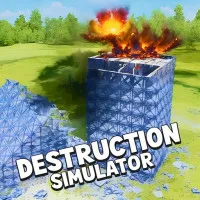
Destruction Simulator, a destruction simulation game, throws you into a silent city that exists for one purpose and one purpose only. The world waits for your first click, and every structure stands like a fragile monument to be tested. The story feels like a secret experiment where you control an unstoppable force and watch how concrete, glass, and steel surrender to gravity. Step into this 3D destructive playground and unleash total chaos right now!
Detailed Gameplay That Turns Power Into Spectacle
The gameplay of Destruction Simulator begins with the player standing before a towering structure that looks strong and unbreakable. The player selects a weapon from an ever-growing arsenal that includes missiles, dynamite, heavy bombs, and experimental devices. Each tool creates a different type of damage, from clean explosions to shockwaves that twist metal and crack foundations. The player chooses from more than thirty different environments, including city blocks, industrial zones, bridges, and custom-made arenas. Every map reacts differently because the physics engine calculates weight, balance, and material strength in real time. A small explosion placed near a support column can cause slow, dramatic collapses where floors tilt, walls crack, and debris rains down in a realistic chain reaction.
Time control becomes a core part of the experience. The player slows down the world to study flying debris, then rewinds to test a new strategy. Gravity shifting allows the player to flip the rules of physics and send rubble floating upward before slamming it back to the ground. Earthquakes and tornadoes add natural disaster layers that twist buildings and scatter fragments in unpredictable patterns. The player also gains access to a powerful map editor. This editor lets the player design custom buildings, adjust material strength, and position weak points. The result becomes a personal test field where every experiment teaches new lessons about structure and collapse. Every level rewards creativity, not just raw destruction.
How To Control The Destructive Power
- Use the left mouse button to rotate the camera by clicking and dragging across the screen.
- Use the WASD keys to move the camera position across the map.
- Use the Q and E keys to raise or lower the camera height for better viewing angles.
- Use on-screen interface buttons to select weapons, change time speed, shift gravity, and trigger disasters.
- Use touch gestures and in-game buttons on mobile devices to rotate the camera and activate tools.
DISCOVER EXTRA INTERESTING SIMULATION GAMES